Privileged Users

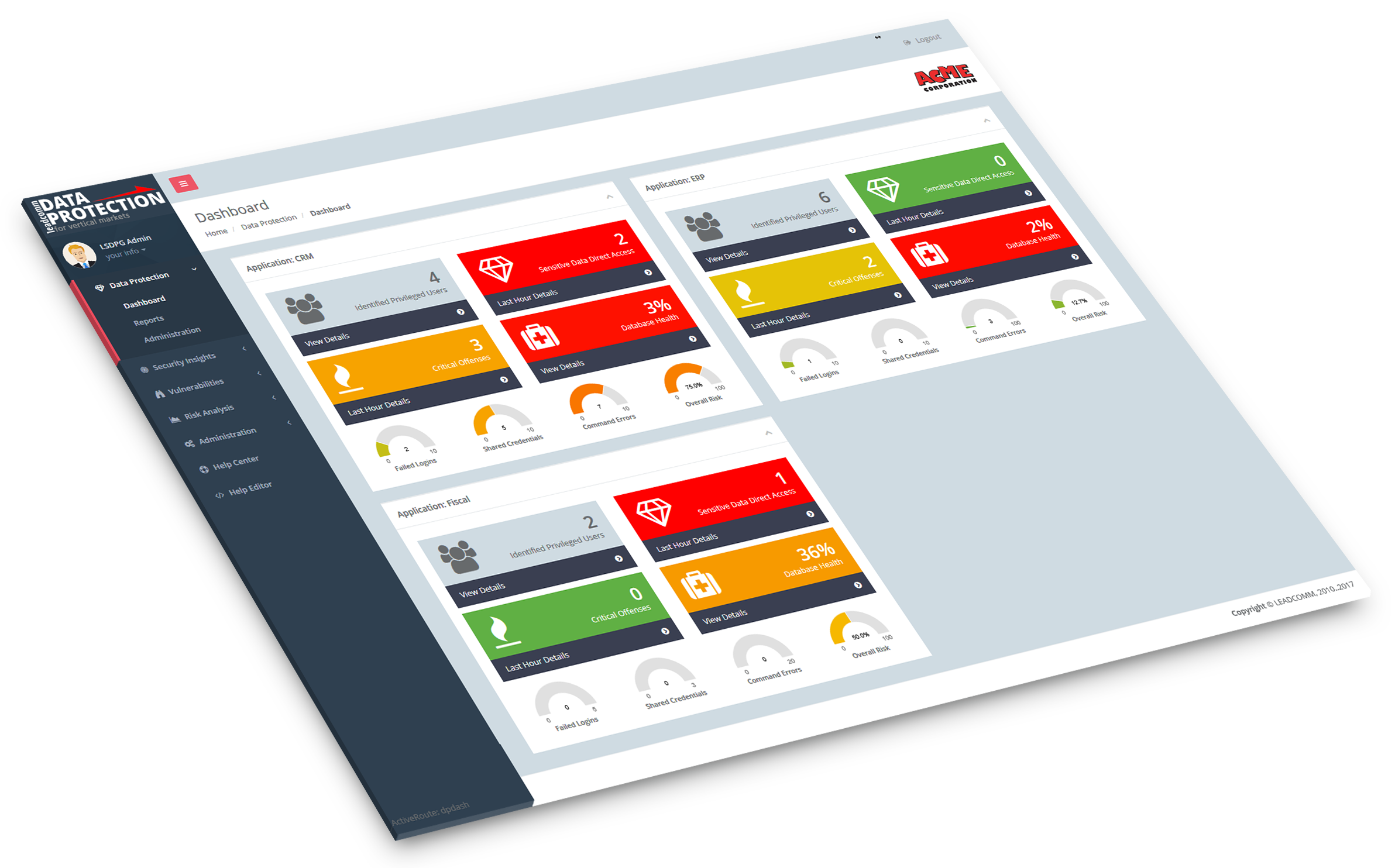
Audit all privileged user access to your sensitive data. Always know exactly what those special users are doing on your databases, regardless of how, what and when

Details »

Unauthorized Accesses

Always be alerted when someone tries to access confidential information by going directly to the database tables instead of going through your systems access controls

Details »

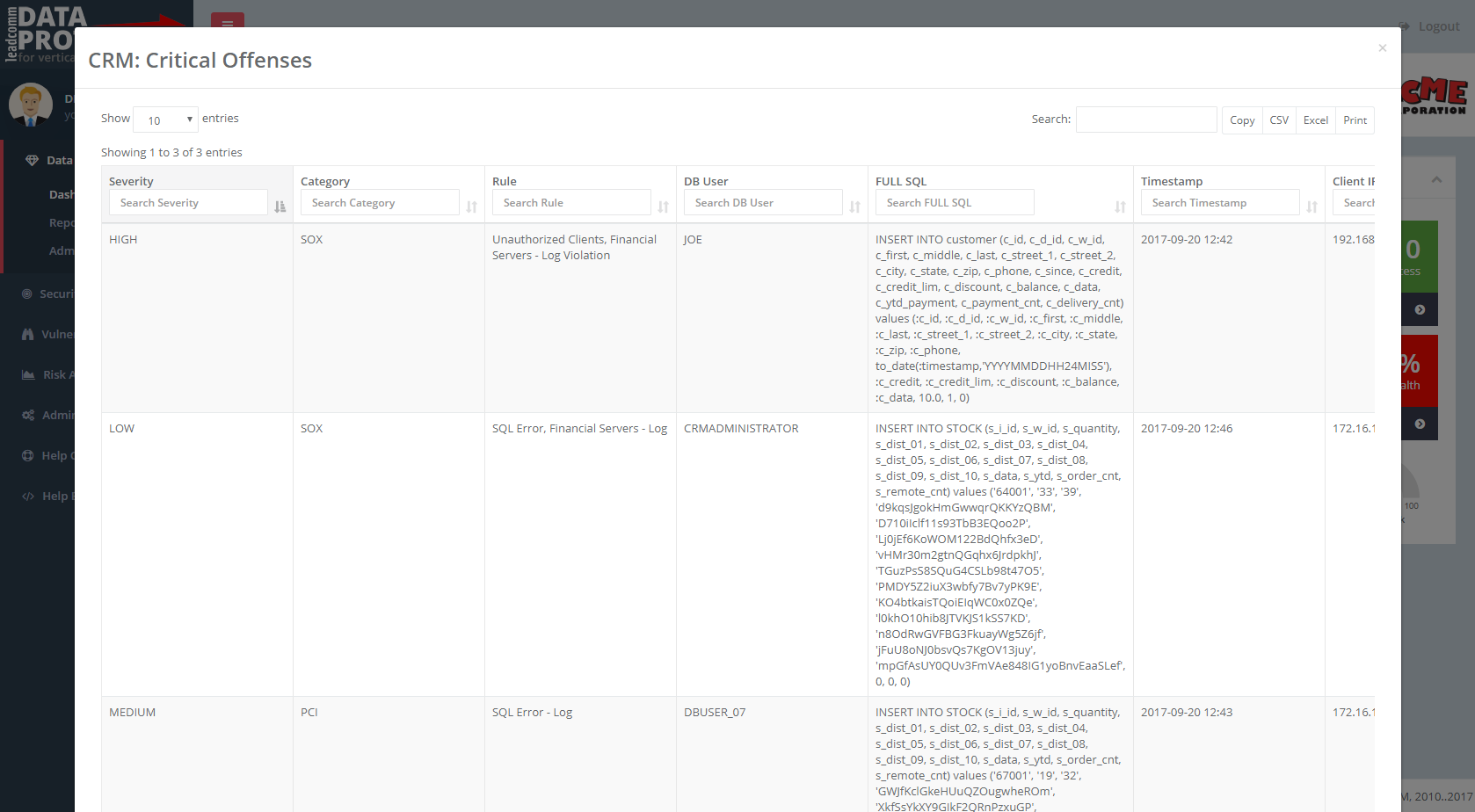
Critical Offenses

Be alerted when any defined database security policy is breached and know exactly who, when, where, and what has been done that caused the breach. Quickly identify the person responsible and the root cause of breach

Details »

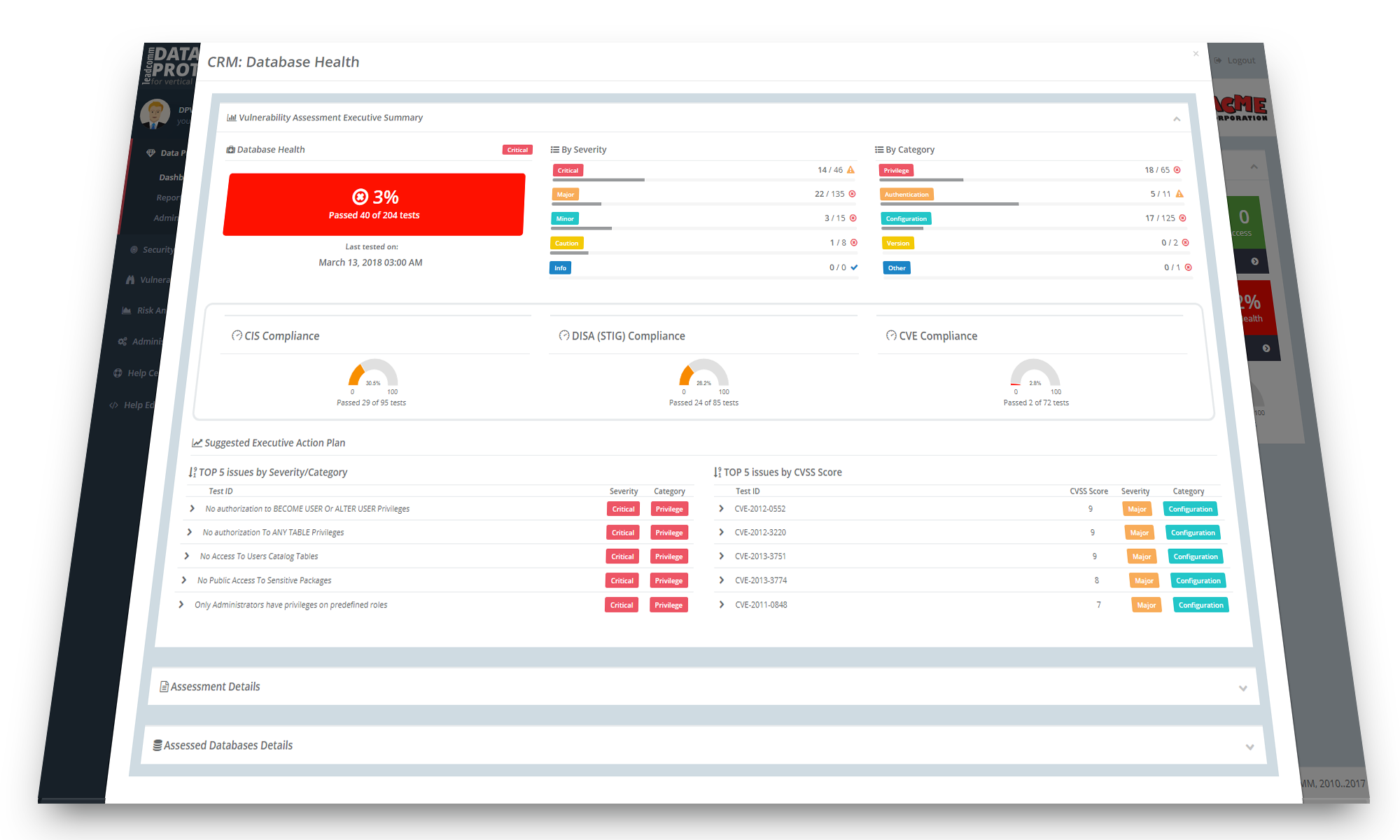
Database Health

Continuously monitor your database vulnerabilities and measure the compliance level against market-defined standards. Never leave an open door for known breaches again

Details »

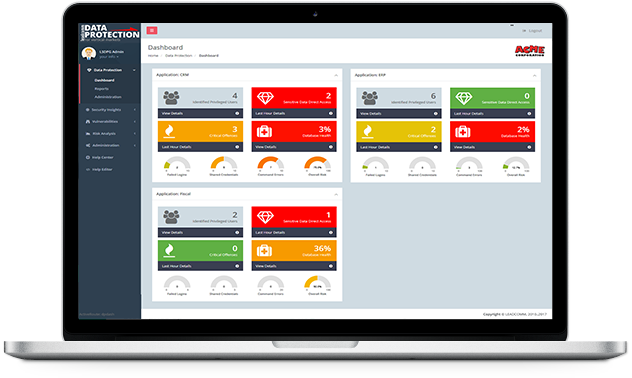
Understand your risks
with our unique Data Protection Dashboard

Take control of your sensitive data. Know what users are doing with your most important information

Failed Logins

Continuous failed logins on any environment is a strong indicator of an attack. DPVM gives you near real-time indicators of failed logins for all monitored environments, domains, or applications

Shared Credentials

Credential sharing poses a high risk for any business. Impersonation of real users is one of the main attack vectors hackers use to gain access to sensitive data and confidential information

dashboard

Command Errors

Command errors are also strong indicators of an attack. Hackers that gain unauthorized access tend to probe the environment by trying different common object and user names, thus generating many errors

Overall Risk

Our exclusive Overall Risk index gives you total control over the risk level for the monitored environments, domains or, applications. This index aggregates information from all DPVM into a single KPI

Monitor Privileged and Special Users

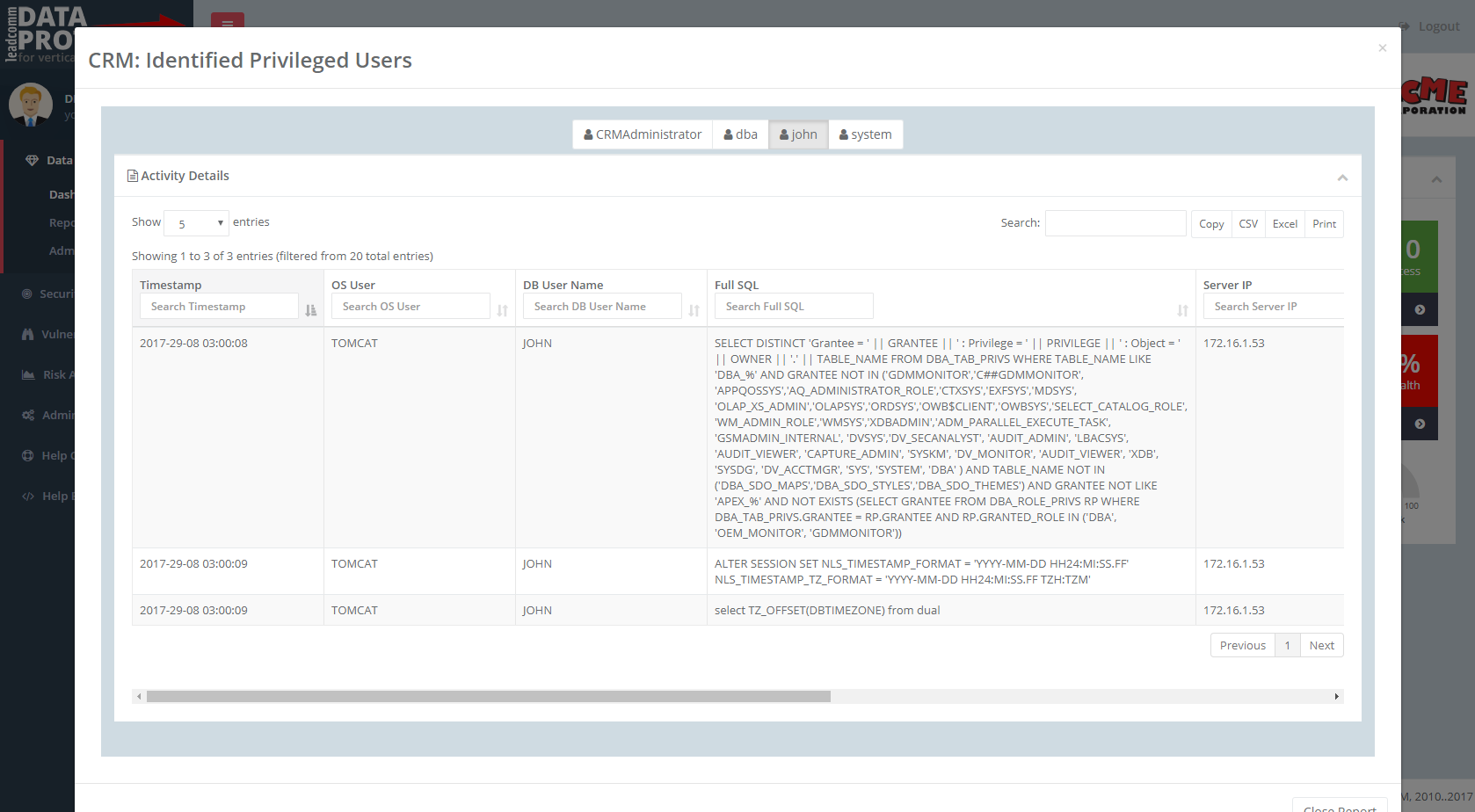
View in-depth information of all activities performed by privileged and special users such as administrators, DBAs, and developers.
Keep track of everything, no matter how, when, where, or what has been executed


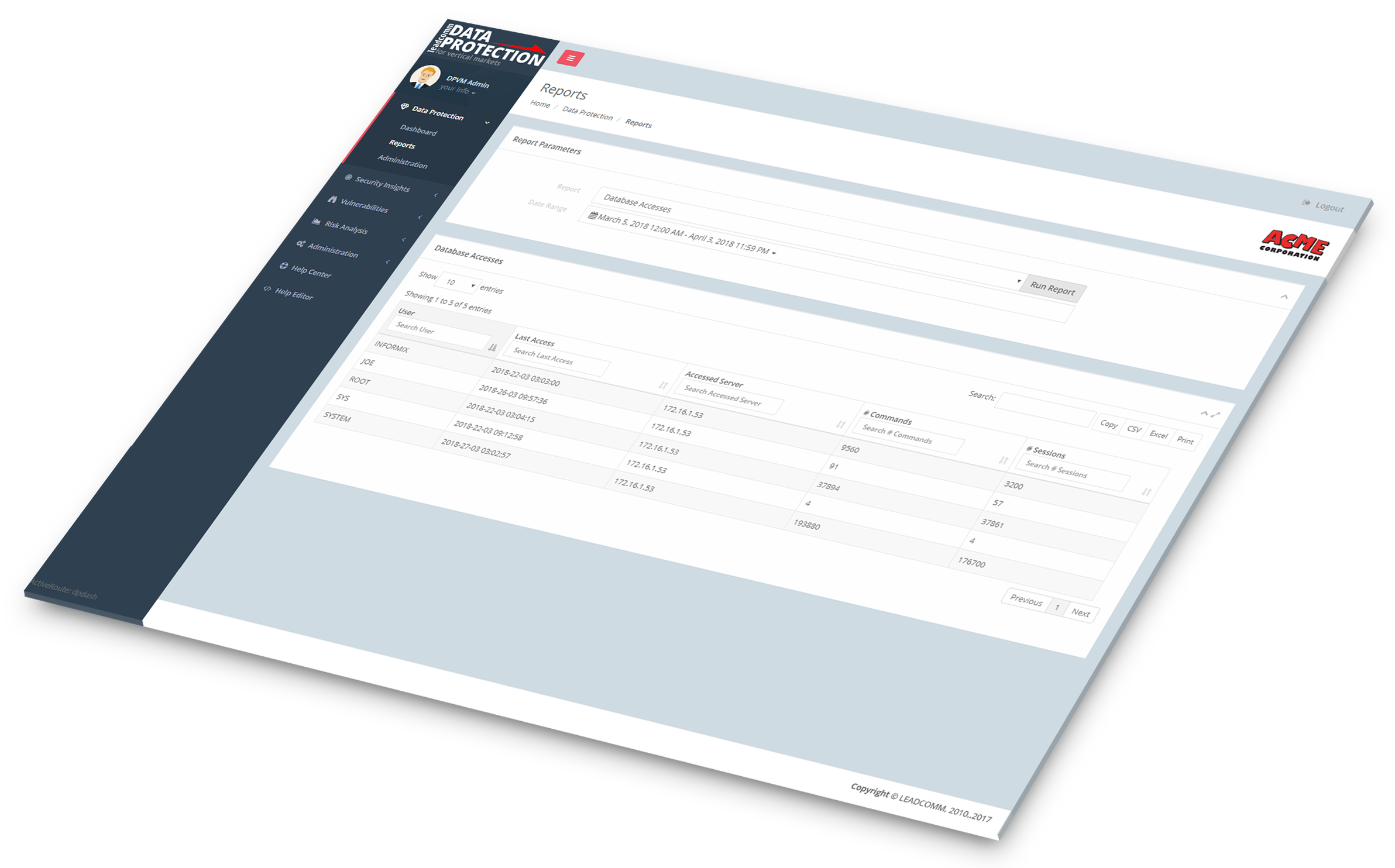
AUDIT PRIVILEGED USERS

Keep track of all activities of privileged users

DPVM leverages IBM Security Guardium's internal auditing capabilities to keep track of all activities performed by administrators, DBAs and other users with privileged access to database settings and data.

Our exclusive "smart track" feature monitors identified privileged users without any impact to regular database operations and without requiring any modifications to application code or database configurations and our advanced reporting capabilities make it easy to discover any actions performed by privileged users.

privileged users report

Sensitive Data Direct Access

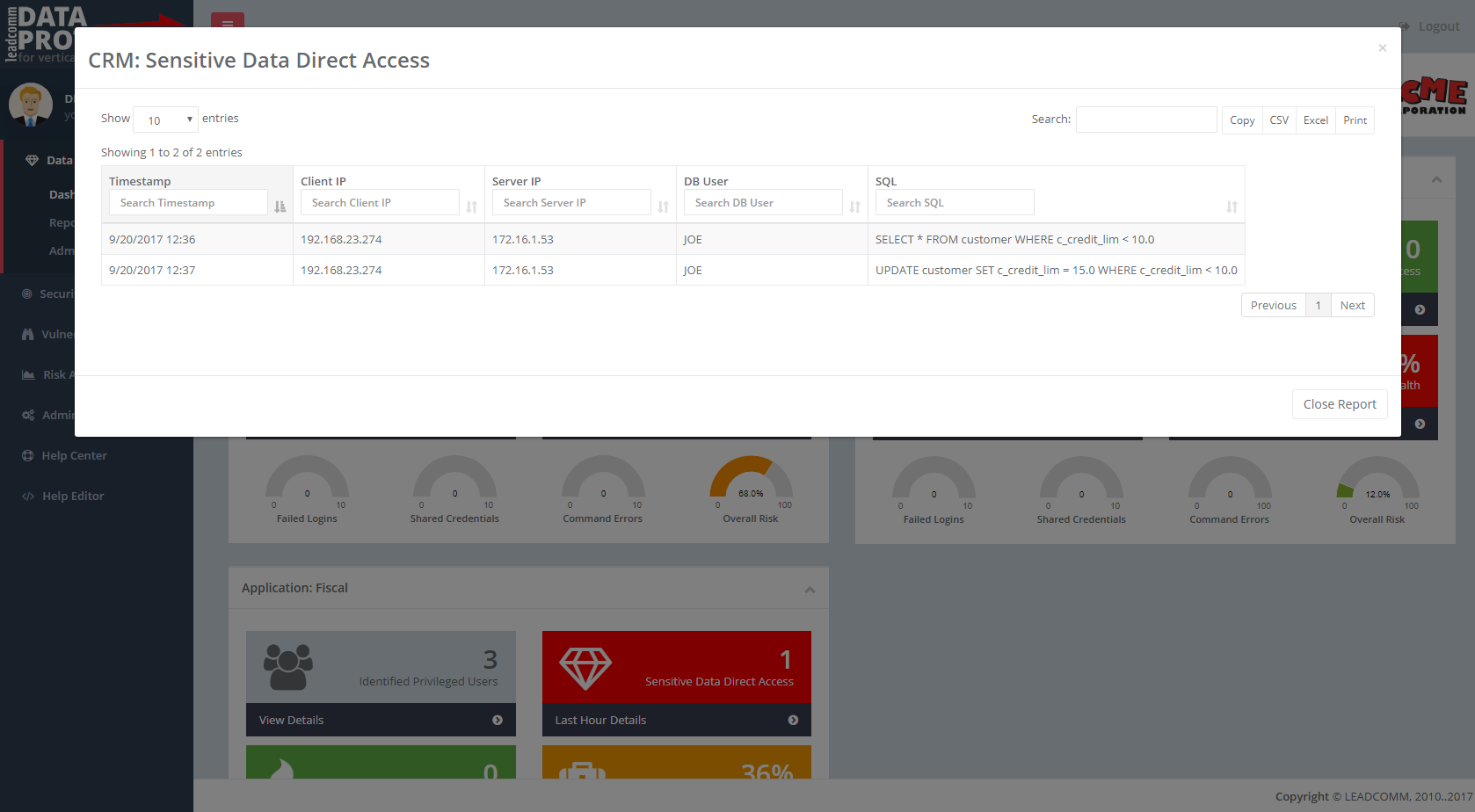
View in-depth information of all users who have access to your database sensitive data, continuously monitoring who is doing what, when, and how.
Leave no open doors that could be used to steal or modify sensitive or privileged data


direct accesses report
AUDIT ALL ACCESSES TO YOUR CROWN JEWELS

Keep track of all users activities on sensitive data

As a general rule, it is OK to access sensitive and confidential data through your trusted applications, as they always apply the correct business rules, access, and disclosure levels to logged-in users. But when the same data is accessed directly on the database server without going through such controls, huge problems can happen.

Our exclusive "smart track" feature monitors all accesses to database objects identified as "Crown Jewels" without any impact to regular database operations and without requiring any modifications to application code or database configurations.

DPVM's advanced reporting capabilities make it easy to track any actions performed on your most important data, at the right moment

View Critical Offenses

View in-depth information of defined database security policy violations.
Enforce company policies and achieve compliance with internal and market-defined standards


MONITOR CRITICAL OFFENSES

Keep track of policy violations that affect sensitive data

From a security point of view, it is always a good practice to define policies that specify how data is classified, used, and distributed across the entire company network. The hard work comes when you try to guarantee its usage. In order to enforce those policies, you need to make sure violators are catched and violations are properly mitigated.

Our exclusive "smart track" feature monitors all database security policy violations without any impact to regular database operations and without requiring any modifications to application code or database configurations.

DPVM's advanced reporting capabilities make it easy to track any actions performed on your most important data, at the right moment

offenses report

Experience Guardium reports the right way
with our Enhanced Report Viewer

Our exclusive enhanced reporting capabilities give you all the flexibility you need
to explore the true richness of IBM Security Guardium reports

Quick Search

Our enhanced viewer provides a quick-search field that can be used to instantly find any kind of data in any report field. This feature does not rely on native Guardium queries and is available for standard or customized reports


Instant Pagination

Regardless of your report size, all pagination is done in-memory by means of our enhanced data cache feature, providing a highly responsive reporting experience

enhanced report viewer

Column Search

In addition to the Quick Search feature, all report columns can be individually searched. When used this way, column searches are combined with the global search box, making it very easy to locate any needed information

One-Click Full-Page View

All reports can be quickly switched to full-page view with just one click. No need to reprocess reports or to wait for long page reloads

Report Customization

All reports can have customized settings for headers, column sizes, column ordering, data type, display formats for dates, IP Addresses, boolean values, and numbers. All customization is performed in our engine and does not require any modification to the underlying Guardium reports

True Excel Export

Our Excel exportgenerates true spreadsheet files, meaning there is no need for any format conversions or column alignments when the file is opened.

All data is ready to use and correctly distributed into rows and columns

Internationalization

View your reports in your native language, despite of how they are built and configured in Guardium.

Our internationalization engine allows you to customize report headers, timestamp, date, time, and number formats

Data Synchronization

Our engine is capable of running reports in the background and syncronize report data between the Guardium Appliances (collectors or aggregators) and our local BigData repository, making report data instantly available when needed. No more waiting for reports to be processed when all you need is a quick answer

Track, prioritize, and solve your
Database Vulnerabilities

Continuously monitor all your database vulnerabilities, and audit database compliance levels to industry standards

CISO READY

Executive Summary

Our exclusive Vulnerability Assessment Executive Summary displays the results of thousands of tests in a dashboard that allows risk managers, security managers, or database administrators to instantly understand the real risks in the monitored environment.

Visually keep track of all detected vulnerabilities, organized by Severity and Category, and also measure compliance levels with industry standards published by CIS, DISA (STIG) and CVE

dashboard
ACTIONABLE

Suggested Executive Action Plan

Our unique Database Health panel shows actionable information about database vulnerabilities.

Our suggested executive action plan displays the TOP 5 issues to be fixed, based on IBM criteria for issue severity and category or on the market-standard CVSS index, making it easy to prioritize problems and to use your budget and human resources on what really matters

CIS: Center for Internet Security     DISA/STIG: Security Technical Implementation Guide     CVE: Common Vulnerabilities and Exposures

Contact Us

At LEADCOMM we provide implementation, integration, and consulting services for organizations looking to implement IBM Security products including IBM Security GUARDIUM, IBM QRADAR Security Intelligence, GUARDIUM Data Encryption, Multi-Cloud Data Encryption, BigData Intelligence, Risk Data Manager and others.

In addition, we provide leading technology security products from other vendors, as well as commercial, enterprise-grade support with our multi-domain support team, including priority issue handling. For more information on any of these services, please email our sales team: [email protected]

USA
Leadcomm International, LLC
100 Park Ave Suite 1600
New York, NY 10017
+1 (212) 351-5050
BRASIL
Leadcomm Comércio, Importação e Exportação LTDA
Rua George Ohm, 230 - Bloco A, CJ 72
São Paulo, SP, 04576-020
+55 (11) 5505-0505

If you have any questions, comments or suggestions or want to contact us for any reason, please drop us a message using the button below
and we will reply your message ASAP.

Send us mail

Or follow us on social media

DPVM is Copyright © 2010..2018 LEADCOMM.
All rights are reserved.

Licensed Materials - DPVM is powered by middleware provided by IBM Corporation and others. IBM is a registered trademark of IBM Corporation, in the United States, other countries or both. All other copyrights and trademarks are property of their respective owners.